 consult@wordexperts.com.au
 1300 122 038
Turning brand templates into editable PDF forms staff can fill in and maintain

Your Microsoft Technology Development and Consulting Experts - Operating since 2000





Intuitive Form Solutions
Our team of Word design experts can deliver your document templates with fill in forms to take your data entry to the next level when it comes to simplicity, usability and intuitive design.
Instead of a template where every copy is filled in a little differently, locked content controls keep the layout, formatting and field order identical no matter who’s completing it, so the data coming back is consistent every time.
Every fill-in form is built from a small set of content controls. Open a row on the right to see what each one does and when they are used.
A single line of typed text with no line breaks, ideal for names, reference numbers or short answers. It can be set to reject anything but numbers or dates, so a staff member cannot accidentally type letters into a field meant for an invoice number.
Behaves like plain text but allows formatting, line breaks and even pasted content including bullet points. Useful for comment boxes, case notes or anywhere the person filling in the form needs more than one line to explain themselves.
Restricts the answer to a fixed list that is defined in advance, such as department names or approval statuses. This is one of the simplest ways to stop inconsistent spelling or formatting creeping into a form that several people fill in.
Opens a small calendar so that the date is always entered in the same format, rather than a mix of 12/3, 12-03-26 and March 12th appearing across different copies of the same form.
A simple on/off toggle for yes/no answers, consent statements or optional extras. Check boxes can also be linked so that ticking one automatically shows or hides another section of the form.
Lets the person filling in the form insert an image, such as a signature, a site photo for an inspection report, or a company logo, directly into a locked placeholder without disturbing the surrounding layout.
A form only stays consistent if the layout underneath it can’t be disturbed. That protection can be built two different ways in Word, and it matters which one your form uses, because they don’t mix well together.
We build almost every form using modern content controls with the surrounding text grouped, rather than the older “Restrict Editing → Filling in Forms” method built for legacy form fields. It’s the more reliable approach for documents opened across different versions of Word.
We Work From What You Already Have
Most of the forms we build start life as something you already use, a Word template, a printed checklist, or an old popup form that’s become awkward to maintain. We rebuild it as a proper fill-in form without losing the branding, tone or layout that your staff and clients already recognise.
An onboarding pack that's been filled in by hand or edited freehand for years, rebuilt as a locked form so new starters can't accidentally overwrite a heading or a table.
Site inspection and audit checklists with mandatory fields, so a form can't be marked complete until every required check box has genuinely been ticked.
Application and referral forms shared outside your organisation, built to stay on-brand and legible on any device the recipient happens to open it on.
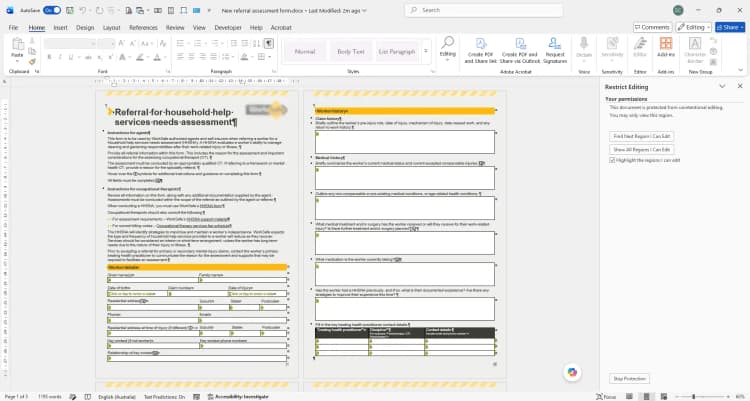
The information entered into a Word form doesn't have to stay in the document. Content controls can capture structured data that can be extracted, checked and used elsewhere in your business. Invaluable to businesses using other microsoft technologies.
Staff or clients complete the content controls in Word, either on screen or via a locked template shared by email or SharePoint. Validation and drop-downs keep every answer in a consistent format from the outset.
A macro steps through every content control in the document, reading each answer by its tag name rather than its position, so the form can be reordered later without breaking the extraction.
The extracted answers are written to an Excel tracking sheet, appended to an Access database, or emailed as a structured summary, ready for reporting without anyone retyping a single field.
Need the data somewhere more powerful than a spreadsheet? Our Access database and Power Platform specialists can connect your Word form directly to the business systems you already use.


Quote or
hourly rate

Ongoing
support

Remote access
or onsite

Tailored
training
What is a fill in form in Microsoft Word?
What's the difference between content controls and legacy form fields?
Can I add a drop-down list or check box to a Word form?
How do I stop people editing the layout of my form?
Can data from a Word form be extracted into Excel automatically?
Will my fill in form still work if it's opened on a Mac or an older version of Word?
Can a fill in form include mandatory fields or validation rules?
How long does it take to build a custom fill in form?
Copyright © 2024. Brayalei Pty Ltd T/As Office Experts Group. ABN 32 093 067 737. ACN 093 067 737. All Rights Reserved.